This post covers the technical patterns behind our Scalene Solutions case study, focusing on the Bicep automation and Application Gateway configuration.
The architecture
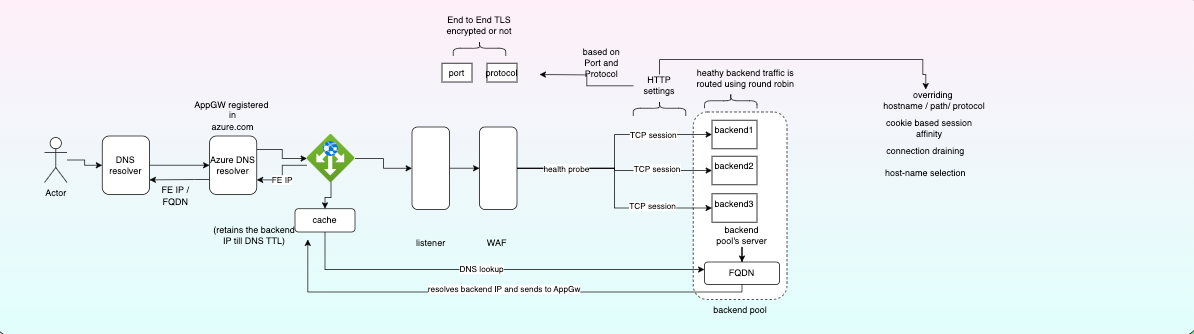
Azure Container Apps run inside a private VNet with no public endpoints. All inbound traffic routes through Azure Application Gateway, which provides WAF protection, SSL termination, and host-based routing.
This gives you the simplicity of Container Apps with the security posture of a properly segmented network.
Bicep loop patterns
The key insight is that Application Gateway configuration is highly repetitive. Every microservice needs a backend pool, an HTTP listener, a health probe, and a routing rule. Instead of writing these individually, we use Bicep’s for loops against a parameter array.
@description('Array of container app configurations')
param containerApps array

resource appGateway 'Microsoft.Network/applicationGateways@2023-11-01' = {
  name: appGatewayName
  location: location
  properties: {
    backendAddressPools: [for app in containerApps: {
      name: '${app.name}-pool'
      properties: {
        backendAddresses: [{ fqdn: app.fqdn }]
      }
    }]
    probes: [for app in containerApps: {
      name: '${app.name}-probe'
      properties: {
        protocol: 'Https'
        host: app.probeHost
        path: '/health'
        interval: 30
        timeout: app.timeoutSeconds
        unhealthyThreshold: 3
      }
    }]
  }
}
Adding a new microservice is now a single entry in the parameter file. No portal clicks, no configuration drift.
What this replaces
On AKS, the same routing was handled by an ingress controller (typically NGINX or Traefik) running inside the cluster. That meant managing the ingress controller itself, its certificates, its scaling, and its interaction with Kubernetes network policies.
With Container Apps and Application Gateway, the routing and security layer is fully managed Azure infrastructure. One less thing to patch, monitor, and troubleshoot at 2am.
When to use this pattern
This works well when you have multiple microservices that need to be privately networked, each with its own custom domain. It is not the right choice for a single container or for workloads that need fine-grained Kubernetes features like custom CRDs or service meshes.